 Zenith Wellness
If your easy runs keep creeping into a higher zone than they should, the problem usually is not your fitness. It is how your zones were set.
Quick answer: By default, Garmin builds your heart rate zones as percentages of an estimated max heart rate of 220 minus your age. That estimate is wrong for most people, which shifts every zone. To fix it, enter your real max heart rate and switch your zone model to percent of heart rate reserve or lactate threshold, both of which account for your actual fitness rather than a flat formula.
The heart rate zones, explained
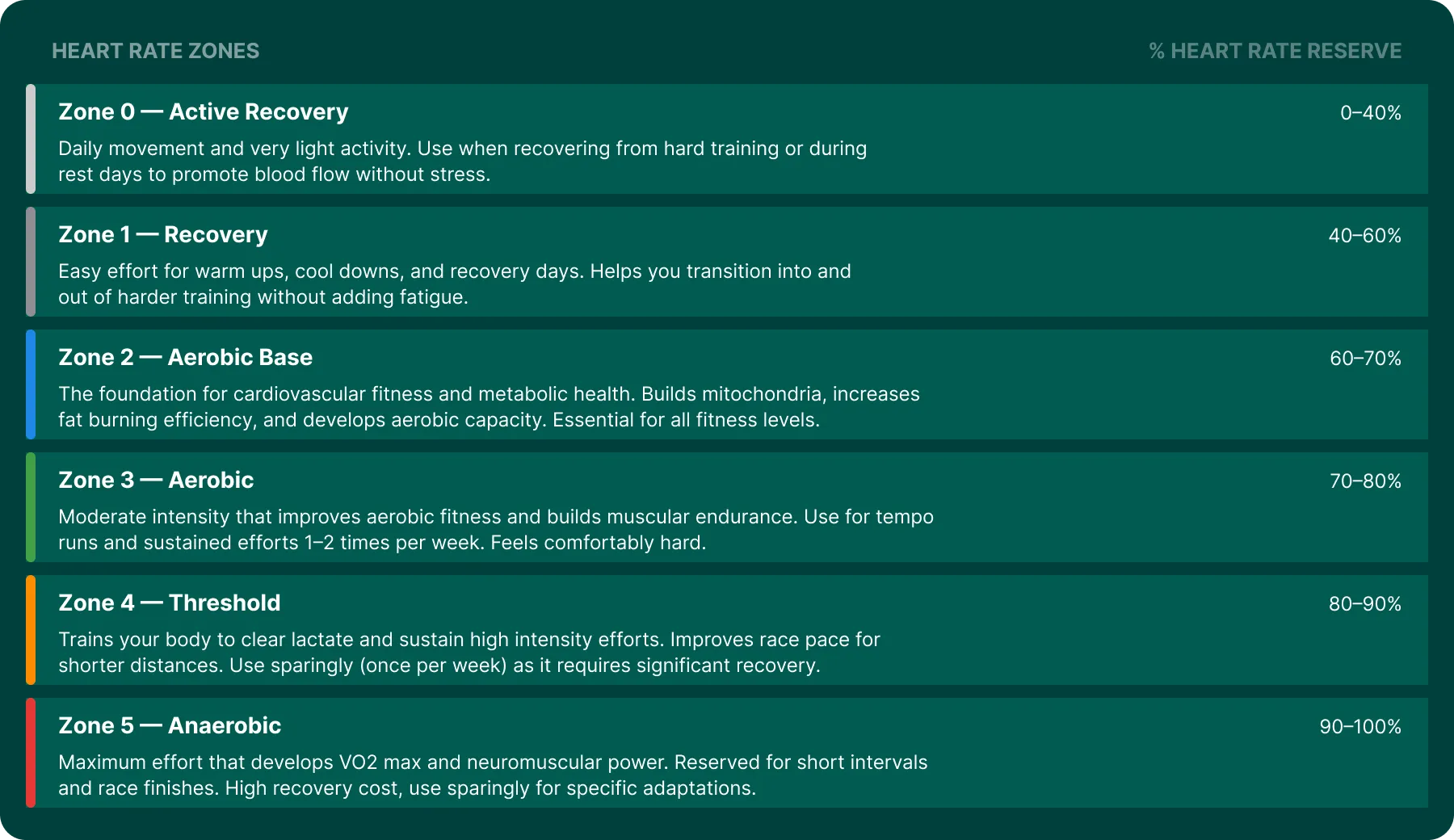
Zones run from easy recovery to maximal effort, and each targets a different adaptation. Here is the full picture, using the six-zone heart rate reserve model this guide points toward. Garmin’s out-of-box default is a coarser five-zone version built on percent of max, which we cover below.
- Zone 0, Active Recovery (0 to 40% of heart rate reserve). Daily movement and very light activity, for rest days and promoting blood flow after hard training.
- Zone 1, Recovery (40 to 60%). Easy effort for warm-ups, cool-downs, and recovery days, without adding fatigue.
- Zone 2, Aerobic Base (60 to 70%). The foundation for cardiovascular fitness. Builds aerobic capacity and fat-burning efficiency, and where most of your training should sit.
- Zone 3, Aerobic (70 to 80%). Moderate, comfortably hard tempo work. Useful one to two times a week.
- Zone 4, Threshold (80 to 90%). Hard but sustainable efforts that train your body to clear lactate. Use sparingly.
- Zone 5, Anaerobic (90 to 100%). Maximal short intervals that develop VO2 max and neuromuscular power. High recovery cost.
Those labels only mean something if the numbers behind them are right, which is where most Garmin setups go wrong.
Why your default Garmin zones are probably off
Out of the box, Garmin does two things that make zones inaccurate for an individual.
First, it estimates your max heart rate as 220 minus your age unless you tell it otherwise. That population average can be off by 10 to 20 beats for any given person. Since your zones are percentages of that number, a wrong max drags every zone boundary with it.
Second, the default model uses percent of max heart rate, which ignores your resting heart rate entirely. Two runners with a max of 190 but resting heart rates of 50 and 70 have very different cardiovascular ranges, yet percent-of-max puts them in the same zone at the same heart rate. That is why fit athletes often feel their easy zone is set too hard.
How to set them correctly
Three steps, all in Garmin Connect or on the watch:
- Set your real max heart rate. Use the highest value your watch has ever recorded in a hard race or interval workout, or run a dedicated max test. Replace the age-estimated number.
- Switch the zone model. Change from percent of max to percent of heart rate reserve or, if you know it, percent of lactate threshold. Heart rate reserve uses your resting and max together.
- Update your resting heart rate so the reserve calculation has both ends of the range.
Once those are right, check the result: your easy runs should sit in zones 1 to 2. If they still land in zone 3, your max is still too low.
Max heart rate by age: what Garmin assumes
By default, Garmin plugs your age into the 220-minus-age formula to guess your max heart rate. Here is what that estimate looks like across ages, and it is worth seeing where you land, because your real max is often 10 to 20 beats off it.
| Age | Estimated max HR (220 − age) |
|---|---|
| 20 | 200 bpm |
| 25 | 195 bpm |
| 30 | 190 bpm |
| 35 | 185 bpm |
| 40 | 180 bpm |
| 45 | 175 bpm |
| 50 | 170 bpm |
| 55 | 165 bpm |
| 60 | 160 bpm |
| 65 | 155 bpm |
If your Garmin has ever recorded a hard effort well above the estimate for your age, that is your evidence the default is holding your zones back. Use the real number instead.
Where to change your heart rate zones in Garmin Connect
The settings are easy to miss. To find and change them:
- Open the Garmin Connect app and go to the menu, then Settings.
- Tap User Settings, then Heart Rate Zones (some watches list it under the device settings).
- Set your max heart rate and resting heart rate to your real numbers.
- Choose the zone calculation: percent of max, percent of heart rate reserve, or percent of lactate threshold.
- Save, and your zones recalculate across the app and sync to your watch.
Why the method matters as much as the number
Heart rate reserve, the Karvonen method, builds zones from the range your heart operates in rather than a fraction of its ceiling. As your fitness improves and your resting heart rate drops, reserve-based zones shift with you. Percent-of-max zones do not, so they drift out of date as you get fitter.
This is exactly how Zenith calculates your zones: six zones on the heart rate reserve method, personalized from your resting and max heart rate, read straight from the Garmin data you already record. If you would rather not hand-tune Garmin’s settings, Zenith gives you correctly modeled zones for every activity, and folds them into a strain score so you can see how hard each session really was.
The payoff: easy days stay easy
Correct zones are what make polarized and Zone 2 training work. When your max is underestimated, your true easy pace gets mislabeled as moderate, so you push too hard on the days meant for recovery and blunt the benefit. Fix the zones first, and everything built on them, from Zone 2 base work to threshold intervals, lands where it should.
For the full picture of turning Garmin data into training you can act on, see The Best App for Your Garmin in 2026.