 Zenith Wellness
Your Garmin shows a stress number all day long, climbing during a tense meeting and dropping when you finally sit down. It is one of the more useful things the watch measures, and one of the least explained. Here is what the number is, where it goes quiet, and how to read it.
Quick answer: Garmin’s stress score is a 0 to 100 read on how activated your nervous system is, calculated from your heart rate variability. Low is calm, high is fight-or-flight, and Garmin groups the day into rest, low, medium, and high bands. It is a real signal, but Garmin leaves gaps when it cannot read cleanly, splits your day at midnight, and boils it down to a number that hides when the stress happened. Zenith reads the same data into a clearer daily level, a 24-hour curve with context, and a comparison to your typical day.
What the stress score measures
Garmin stress is built from your heart rate variability, the small differences in timing between one heartbeat and the next. When you are rested and recovered, that variability is high and your stress reads low. When your body is activated, variability drops and stress reads higher. So it reads your nervous system rather than your mood. A hard interval session, a strong coffee, a work deadline, even good excitement can all push it up.
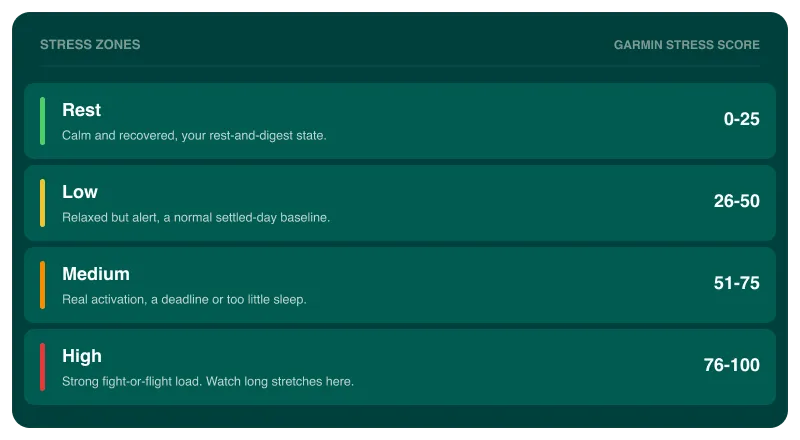
Garmin scores it 0 to 100 and sorts your time into four bands:
- Rest (0 to 25): calm, recovered, parasympathetic
- Low (26 to 50): relaxed but alert
- Medium (51 to 75): meaningful activation
- High (76 to 100): strong fight-or-flight load
Where Garmin goes quiet
This is the part most people never hear. Garmin does not score stress every minute. It stays silent whenever it cannot read you cleanly: the watch is off your wrist, you are moving too much, you are mid-workout, or there is not enough signal to trust. Rather than guess, it marks those stretches as no-data.
That is the right call, since a workout is not “stress” in this sense and an empty wrist is not calm. But it has two consequences worth knowing:
- Your stress day has holes. The curve you see is only the stretches the watch could read.
- How much it saw changes daily. One day the watch might monitor you for twenty hours, the next for ten. That matters, because a raw count of stressful minutes would make a lightly-monitored day look calmer than it was.
Why the daily number hides the story
Two more things blunt Garmin’s own stress read. First, it runs on the calendar day, midnight to midnight, which splits a single night’s sleep across two dates and does not match how you live a day. Second, a single day-average, or Garmin’s own one-word summary, tells you a number moved without telling you when or why. A day that was calm except for one brutal afternoon can read the same as a day that was mildly tense throughout, and those are not the same day.
The signal in stress is not the average. It is the shape: when it spiked, how long it stayed up, and what you were doing at the time.
How Zenith reads your stress
Zenith takes the same stress data your Garmin already records and does the interpreting Garmin skips.
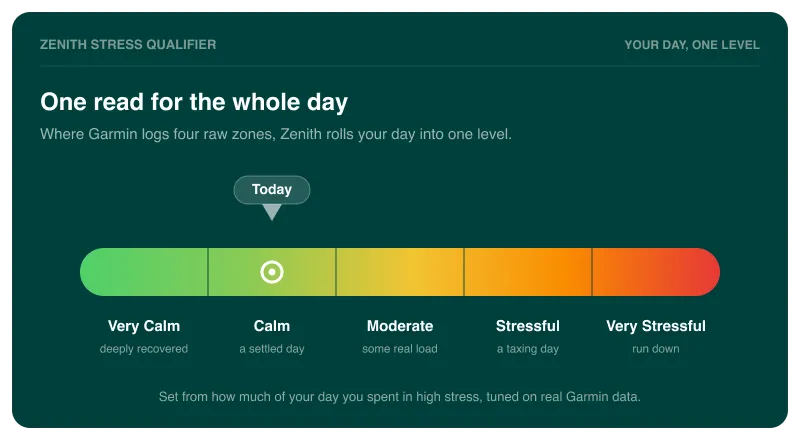
- A clear daily level. Instead of a raw average, Zenith classifies each day from Very Calm to Very Stressful, based on the share of your monitored time spent in the high band rather than raw minutes, so a day the watch only saw for half its hours is still judged fairly. The levels are tuned on nearly 20,000 days of real Garmin data from Zenith users.
- A sleep-to-sleep day. Your stress day runs from when you woke to when you next fall asleep, so your night stays in one piece and the read matches how you lived it.
- A 24-hour curve with context. Zenith lays your sleep, naps, and workouts over the stress curve, so a spike is not a mystery. You see the hard session, the short night, or the stretch of back-to-back meetings that drove it. A number on its own says stress went up; the context says why, which is the only version you can act on.
- A comparison to your typical day. Today’s stress is measured against your own usual version of that weekday, so you know whether this Tuesday was rough or just normal for you.
Stress also feeds the bigger picture. It is what drains your Body Battery through the day, and a taxing day shows up in your next-morning recovery. Zenith reads all of it from the HRV and stress your watch already tracks, alongside your sleep, so the pieces line up instead of sitting in separate screens. For the bigger gap this fills, see why your Garmin collects everything and explains nothing.
To see your own stress read from your Garmin, try Zenith. It’s free to start.